
The Architecture of Zero Trust: Transitioning from Perimeter Defense to Identity-Centric Security
By Mohammad Movahedi
Introduction: The Fall of the Medieval Castle Model
Traditional cybersecurity used a “castle-and-moat” approach, relying on perimeter defenses like firewalls to protect internal assets. Once inside, authenticated users were implicitly trusted and could navigate sensitive systems without further checks.
Modern trends have rendered this model obsolete. Hackers now easily bypass perimeters through phishing and stolen credentials. Simultaneously, a remote workforce and distributed corporate data across public and hybrid clouds have dissolved the traditional boundary.
In response, the Zero Trust philosophy has emerged. It mandates that no user be implicitly trusted, regardless of location. Instead of a single entry check, the system requires continuous verification for every action to maintain constant security.
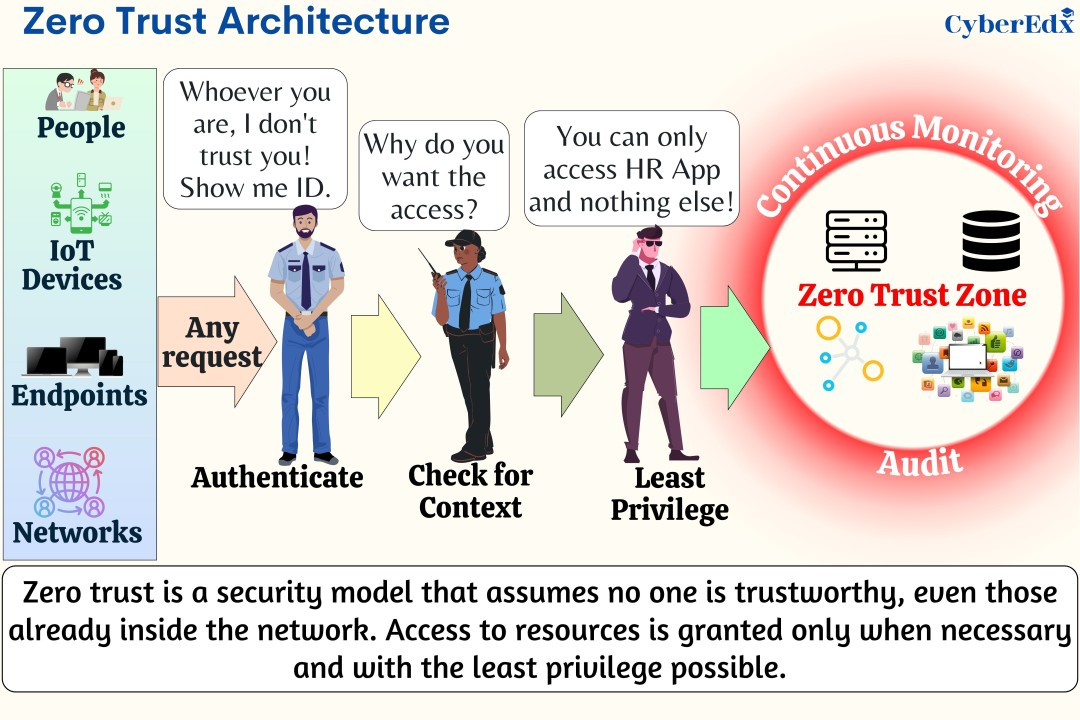
The Core Analogy: The Hotel Floor vs. The VIP Bodyguard
To understand the differences between the old perimeter approach and the Zero Trust approach we are using the analogy of a hotel.
The Old Way: The Hotel Floor and Virtual Local Area Networks (VLANs)
The traditional method for securing internal networks involves using Virtual Local Area Networks (VLANs) to segment the network. VLANs function similarly to a hotel keycard system. For instance, the finance department may occupy one VLAN while marketing occupies another. Much like a keycard grants entry only to specific floors of a hotel, a VLAN restricts access to certain network segments. While the keycard prevents access to floors beyond the one intended, it allows complete freedom within the designated area.
In computer networking, when a user is placed on a Virtual Local Area Network (VLAN), their computer receives a specific IP address that belongs to a shared broadcast domain. Following the hotel floor analogy, this connection allows the computer to actively interact with any other device on the same network segment—such as servers, printers, and other employee laptops—just as a guest can access any room on their permitted floor. However, this setup poses a significant security risk; if a hacker successfully infiltrates a VLAN, the inherent trust within these legacy networks enables lateral movement. This means malware can spread rapidly from one infected device to others on the same “floor,” escalating isolated incidents into widespread data breaches.
The New Way: The VIP Bodyguard and Micro-Segmentation
Zero Trust eliminates broad network access by removing the traditional keycard concept, assigning strict access controls upon network attempt.
In this case, zero trust assigns a digital bodyguard to each user, who does a thorough background check to verify your identity. By looking for viruses, missing security updates, or odd applications on your computer, it determines whether you are healthy. The bodyguard then puts blindfolds on you once it is certain you are safe. It leads you straight to the exact room you require, for example Room 502, opens the door, puts you inside, and locks the door. The hallway is off-limits to you. Other door handles cannot be jiggled. Even the existence of Rooms 501 and 503 is unknown to you.
Technically, a technique known as micro-segmentation is used to accomplish this VIP bodyguard mechanism. The large corporate network is divided into small, isolated safe zones using micro-segmentation. The architecture keeps attackers from seeing or touching anything else by quickly installing strict software-defined firewalls around specific applications rather than the entire organization. If a laptop is compromised, the attackers stay within the access limit of that laptop.
| Feature | The Old Way (VLANs & Perimeters) | The New Way (Zero Trust & Micro-Segmentation) |
|---|---|---|
| The Analogy | The Hotel Floor Keycard. | The Strict VIP Bodyguard. |
| Trust Model | Trust is implied based on your location on the network. | Trust is never implied; it must be continuously earned. |
| Visibility | Users can see and scan other devices on the same network segment. | Users are “blindfolded” and can only see the specific app they are authorized to use. |
| Lateral Movement | High risk. Malware can easily spread sideways from one infected computer to many others. | Extremely low risk. Infected computers are isolated in microscopic network segments. |
| Access Level | Broad network access. | Least privilege access (only the exact file/app needed). |
The Engine of Zero Trust: Identity and Continuous Authentication
The underlying technology needs to be extremely fast and robust in order for the VIP bodyguard concept to succeed. Identity and Access Management (IAM), in addition with continuous authentication, is the driving force behind this entire concept.
Your physical location is no longer used to establish trust because the system no longer cares whether you are sitting in a park or inside the corporate headquarters. As a result, the new security perimeter is your digital identity. The IAM system must firmly show a user is who they say they are before granting them access to a company file.
The Identity Check: Multi-Factor Authentication
Proving identity effectively necessitates more than just a password, as passwords are vulnerable to various threats, including automated guessing, phishing scams, and theft. As a result, the Zero Trust security model places significant emphasis on Multi-Factor Authentication (MFA). MFA requires users to furnish multiple types of evidence from three defined categories to verify their identity.
- Something you know: This is the traditional password or a secret PIN code.
- Something you have: This is a physical object you possess, like a secure hardware token plugged into a USB port, or a temporary code sent to a specific authenticator app on your company smartphone.
- Something you are: This relies on biology, known as biometrics. It includes scanning a fingerprint, utilizing facial recognition cameras, or analyzing voice patterns.
Combining multiple security factors significantly hinders unauthorized hackers from accessing sensitive information. Even if a hacker manages to obtain an employee’s password, they remain obstructed from gaining entry without the physical smartphone or fingerprint of the employee, which serve as critical elements for the second and third layers of security checks.
The Health Check: Device Posture Validation
The identity of a human is only part of the equation; the VIP bodyguard must also validate the health of the device used, referred to as Device Posture Validation.
When a computer attempts to connect to the company, the Zero Trust system performs comprehensive checks on the device’s operating system, including the status of antivirus software, firewall settings, and the presence of critical security patches. It also verifies digital certificates to confirm the device’s legitimacy as a company-issued laptop. If the computer fails any of these health checks, access is denied, regardless of the user’s identity.
The Continuous Verification: Never Looking Away
In the Zero Trust model, Continuous Authentication or Continuous Verification replaces the old castle model’s one-time authentication, where the system continuously monitors the user throughout the day.
Modern security systems leverage behavioral analytics and machine learning to establish a baseline of normal behavior for each employee, monitoring factors such as login times, work locations, typing speeds, and frequently accessed files.
In instances where an employee in the marketing department attempts to download a substantial folder of sensitive payroll data at 3:00 AM from an international location, the system identifies this unusual activity and takes immediate action. It may halt the download, requiring the employee to verify their identity through a fingerprint scan, or it could sever the connection entirely and activate a security alert.
The Brains of the Operation: The Policy Engine
All complex decisions regarding access are made rapidly by a central system called the Policy Engine, which functions like a strict judge utilizing the “Kipling Method” to determine access permissions based on specific rules for each request.
- Who is asking for this file?
- What exactly are they trying to open?
- When are they trying to do it (is it during normal business hours)?
- Where are they located in the world?
- Why do they need it for their specific job role?
- How secure is the computer they are using right now?
Only if all questions are satisfactorily answered will the engine direct the network to briefly open a secure, temporary pathway to the requested file.
Real-World Example in Corporate: The Freelancer at a Coffee Shop
Managing a boundaryless workforce poses a significant challenge for Zero Trust security, as companies frequently engage third-party contractors and freelancers whose devices are not owned by the company, complicating security oversight.
Consider a freelance video editor hired to work on a top-secret, unreleased film. The freelancer is using their own unmanaged laptop while sitting at a Starbucks table and connected to an unprotected public Wi-Fi network.
The Risks of Traditional VPNs
In the past, the company would require the freelancer to install a Virtual Private Network (VPN) program on their laptop in order to allow them to work. A VPN is made to drill a long, encrypted tunnel straight into the centre of the business’s network via the public internet.
This situation poses significant risks as the company is unaware of the freelancer’s internet activity or potential spyware on their personal laptop. Enabling a VPN allows this possibly compromised device to connect directly to the company’s internal network, trusting it after the initial password verification. Consequently, any existing virus could infiltrate the studio’s servers through the VPN tunnel.
The Solution: Secure Web Browsers and Clientless ZTNA
Instead of letting a dangerous personal laptop touch the main company network, Zero Trust handles external workers using a technology called Clientless Zero Trust Network Access (ZTNA) combined with Remote Browser Isolation (RBI).
First, the business saves the freelancer the trouble of setting up complicated, brand-new corporate accounts. Instead, they use federated identity technology to let the freelancer connect in with an identity they already have and trust, like a protected Google or Microsoft account.
The Zero Trust method does not grant the freelancer a VPN tunnel once they have proven their identity. Rather, it launches a web browser window that is completely cloud-based and extremely safe. Without downloading or installing any extra software agents, the freelancer logs into the portal using their standard web browser.
The video editing process is conducted on a secure computer server located in a company’s data center or cloud environment, which hosts all sensitive movie files. It streams a continuous feed of visual data to a freelancer’s laptop, allowing for real-time editing without any direct access to the actual data files or the company’s internal network. Thus, even if the freelancer’s laptop is compromised by malware, the viruses cannot affect the server as they cannot traverse the pixel stream. Once the editing session concludes, the temporary browser instance created in the cloud is immediately erased, ensuring no remnants of the confidential movie files remain on the freelancer’s personal device.
The Hard Truth: Why Zero Trust is a Grueling Marathon
Building a true Zero Trust cybersecurity system presents significant challenges, as it necessitates intense labor, high costs, and substantial organizational transformation. The process is long and arduous, likened to a multi-year marathon, rather than a straightforward task that can be solved by simply purchasing and activating a software solution.
The Problem of Perfect Communication: The HR Integration
One of the hardest truths about Zero Trust is that it requires every single piece of software in a company to talk to each other perfectly. Because trust is based entirely on a user’s identity and their job role, the security software must always know exactly who works for the company and what their current job title is.
This means technical security tools must integrate seamlessly with Human Resources (HR) software. Promotions must prompt the Zero Trust Policy Engine to upgrade an employee’s access rights, while terminations require immediate notifications to security software to lock all accounts associated with the terminated employee.
If communication pipelines between HR software and security systems fail, it creates significant security vulnerabilities, allowing terminated employees to access systems undetected. Ensuring correct integration between various software is intricate and prone to errors.
The Headache of Complex Infrastructure and Legacy Debt
Before a company can build the individual VLan like segments required for micro-segmentation, the IT department has to perfectly map out where every single piece of data lives and exactly how every computer program talks to every other program. This is incredibly difficult.
Many companies face challenges due to complex infrastructures composed of modern cloud software, older internal servers, and outdated legacy databases. Implementing a strict Zero Trust security model can inadvertently disrupt essential data pathways, such as those for processing credit card transactions, leading to potential revenue loss. Identifying and mapping these connections is a lengthy process, and integrating legacy systems with contemporary security measures requires the development of specialized middleware.
User Friction and Annoyed Employees
The final hard truth is that the philosophy of “never trust, always verify” causes significant friction for the humans trying to do their jobs.
Under the Zero Trust model, employees no longer have unrestricted access to company files. This change has led to restrictions where employees are now denied access to folders they previously could browse, based solely on their job titles and the need-to-know principle.
Employees experience significant frustration when a security system frequently interrupts their workflow with requests for fingerprint scans or text message codes for application access. This constant demand results in change fatigue and potential workplace revolt. To mitigate these issues, IT teams need to develop a “context-aware” system that limits unnecessary prompts. For example, if a user is in a familiar environment using authorized equipment, the system should verify their identity discreetly without additional complications. Successfully achieving a balance between robust security measures and minimal user disruption presents a substantial challenge.
| Implementation Challenge | Why It Is So Difficult | The Required Solution |
|---|---|---|
| Software Integration | The security engine relies entirely on accurate, up-to-the-second data about human beings. | Flawless, automated pipelines must be built to connect HR termination software directly to IT identity controls. |
| Complex Infrastructure | Companies have messy combinations of cloud, on-premises, and old legacy tech. | Painstaking data mapping must occur to find hidden application connections before turning on blockades. |
| Employee Friction | Constant identity verification prompts slow down work and frustrates staff. | Security teams must use smart, silent background checks and Single Sign-On (SSO) to hide the security from the user. |
Conclusion: The Bottom Line
The ultimate conclusion regarding Zero Trust Architecture is that while it is a grueling marathon to set up, fine-tune, and maintain, it is an absolutely necessary evolution for the survival of the modern enterprise. By shifting the security philosophy from trusting locations to constantly verifying identities and strictly limiting access, organizations can fundamentally cripple an attacker’s ability to operate.
The concept of Zero Trust offers value not by establishing an unbreachable barrier to hackers, but by containing breaches effectively. It implements stringent, constantly monitored security measures around every user and application, ensuring that events like a phishing email, a compromised device, or a stolen credential do not lead to a major security disaster for the organization.
References
- Fortinet (2025) How to Implement Zero Trust. [online] Available at: https://www.fortinet.com/resources/cyberglossary/how-to-implement-zero-trust [Accessed 23 Mar. 2026].
- Veridify Security (2025) Zero Trust Security for Legacy OT Devices. [online] Available at: https://www.veridify.com/article/zero-trust-security-for-legacy-ot-devices/ [Accessed 23 Mar. 2026].
- Trend Micro (2023) ZTNA vs VPN for Secure Remote Work. [online] Available at: https://www.trendmicro.com/en_us/research/22/h/ztna-vs-vpn-secure-remote-work.html [Accessed 23 Mar. 2026].
- Cloudflare (n.d.) Zero Trust, SASE and SSE: Foundational Concepts for your Next-Generation Network. [online] Available at: https://blog.cloudflare.com/zero-trust-sase-and-sse-foundational-concepts-for-your-next-generation-network/ [Accessed 23 Mar. 2026].
- Ankura (n.d.) 5 Key Challenges in Adopting Zero Trust and How to Deal with Them. [online] Available at: https://ankura.com/insights/5-key-challenges-in-adopting-zero-trust-and-how-to-deal-with-them [Accessed 23 Mar. 2026].